Why your team keeps dropping the ball (and how TaskTag quietly fixes it with tags, chat, and...
.png?width=1080&height=810&name=4%20(3).png)
Let’s address the elephant in the conference room
You found a tool you love TaskTag. You see the potential. You know it will save hours of administrative headaches. But when you mention "rolling out new software" to your team, you're met with the collective groan of tool fatigue.
And who can blame them?
The average team uses dozens of disconnected tools. Your team isn’t afraid of work they’re afraid of another login, another interface to learn, and another place to lose information.
Buying software is easy. Getting buy-in is hard.
Here’s your internal battle plan to pitch TaskTag, overcome resistance, and ensure your team doesn’t just switch — they stick with it.
.png?width=1080&height=810&name=1%20(11).png)
Step 1: Validate the "Toggle Tax" Pain
Don’t start by selling features. Start by selling relief.
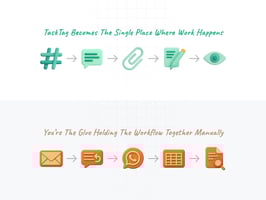
Your team is suffering from context switching the Toggle Tax. They’re tired of juggling tools: chatting in Slack, assigning tasks in Asana, searching for files in email, and logging updates in spreadsheets.
The Pitch:
“We’re not adding another tool. We’re removing three. TaskTag helps us stop the window-switching madness.”
By framing TaskTag as workflow consolidation not feature overload you shift the conversation from resistance to curiosity.
Step 2: The Trojan Horse Strategy — "It’s Just Chat"
The biggest barrier to software adoption is the learning curve. Gantt charts and Kanban boards are intimidating to non-technical team members.
What makes TaskTag different:
It looks, feels, and behaves like the chat apps your team already uses.
The Pitch:
“If you can send a message, you can use TaskTag. It’s chat with structure.”
There’s no need for complex onboarding. No new process to memorize. Your team just keeps chatting — and the project management happens in the background.
Step 3: Start with a Pilot Project
Rolling out TaskTag company-wide on day one is a recipe for confusion.
Start small. Choose one project or one team to test TaskTag in a real-world setting.
Pick a Project:
Choose one with lots of moving parts (e.g., “Q4 Marketing Launch” or “Site B Renovation”).
Set a Rule:
“For this project, no emails. All communications happen in TaskTag.”
Show the Win:
After one week, show how easy it is to search for a file using a hashtag instead of digging through email threads.
Once the pilot team experiences the benefit firsthand, they’ll become your internal champions.
Related: Recurring Delivery Route Workflow: Why Delivery Teams Are Replacing CompanyCam with TaskTag
Step 4: Demonstrate the Chat-to-Task Workflow
This is your “aha” moment.
Show the team how to assign deliverables without leaving the conversation.
The Old Way:
Read message → Open Trello/Asana → Create card → Copy/paste → Tag someone
The TaskTag Way:
Read message → Click Assign → Done
When they see how much time they save, they’ll stop asking why and start asking why not.
Step 5: Foster a Culture of "Done"
Nothing builds habit faster than visible momentum.
Encourage your team to use the "Complete Task" feature right inside chat. When a task changes status immediately — and the thread reflects that it creates instant feedback.
Pro tip:
Praise early adopters in public chat.
“Great job tagging that update, Sarah saved me a follow-up.”
Positive reinforcement builds new habits faster than mandates ever will.
The Bottom Line
You’re not asking your team to work harder you’re asking them to stop working in silos.
TaskTag isn’t about micromanagement. It’s about centralized communication and smarter execution.
When your team sees fewer meetings, fewer email threads, and faster turnaround, they won’t just adopt TaskTag — they’ll wonder how they ever worked without it.
.png?height=200&name=1%20(12).png)