Your CompanyCam feed shows a stop-work order perfectly. Here’s how to prevent one from ever being...
.png?width=1080&height=810&name=1%20(12).png)
This Week’s Trending Discovery
If you've been searching for client onboarding workflow, project management with chat, or CompanyCam alternative for agencies, you’ve likely come across the workflow that’s reshaping how over 5,000 teams are handling client projects right now.
CompanyCam changed how agencies document work. But in 2025, photos alone aren’t enough. Modern agencies need integrated systems where communication, task management, and client collaboration live in the same place.
That’s why this Client Onboarding Workflow is going viral. It replaces fragmented processes with a unified client experience from day one.
The CompanyCam Reality Check: When Visual Proof Isn’t Project Management
Let’s be clear about where CompanyCam excels:
- Photo documentation
- Time-stamped visual records
- Project-based galleries
But here’s what agency teams are realizing when they need to manage projects — not just document them.
The Critical Gaps CompanyCam Can’t Fill
- No integrated chat — Photos don’t replace conversation
- No @mentions — Can’t notify team members
- No #hashtag linking — Can’t organize related tasks
- No task templates — Everything starts from scratch
- No file management — Contracts and assets live elsewhere
- No role permissions — Clients see too much or too little
Agencies using CompanyCam + Slack + Google Drive + spreadsheets are feeling the hidden cost of tool sprawl — and looking for a better way.
The Hidden Cost of Photo-First Project Management
What’s breaking for agencies and freelancers:
- Tool sprawl — Chat in Slack, photos in CompanyCam, tasks in Asana, files in Drive
- Context switching — Jumping between five tools for one client
- Lost conversations — “Did we talk about this in Slack or email?”
- Onboarding delays — Clients wait while teams chase updates
- Client confusion — No central place to view progress
Photos are proof of work. But without an integrated workflow, they create more questions than answers.
Enter TaskTag: The All-in-One System CompanyCam Users Actually Needed
.png?width=1048&height=1048&name=1%20(13).png)
TaskTag combines chat, task management, and visual documentation in a single platform.
The Workflow That’s Converting Thousands
Create Project & Chat → Use @mentions and #hashtags → Assign Tasks → Complete in One System
No app switching. No lost context. No confusion.
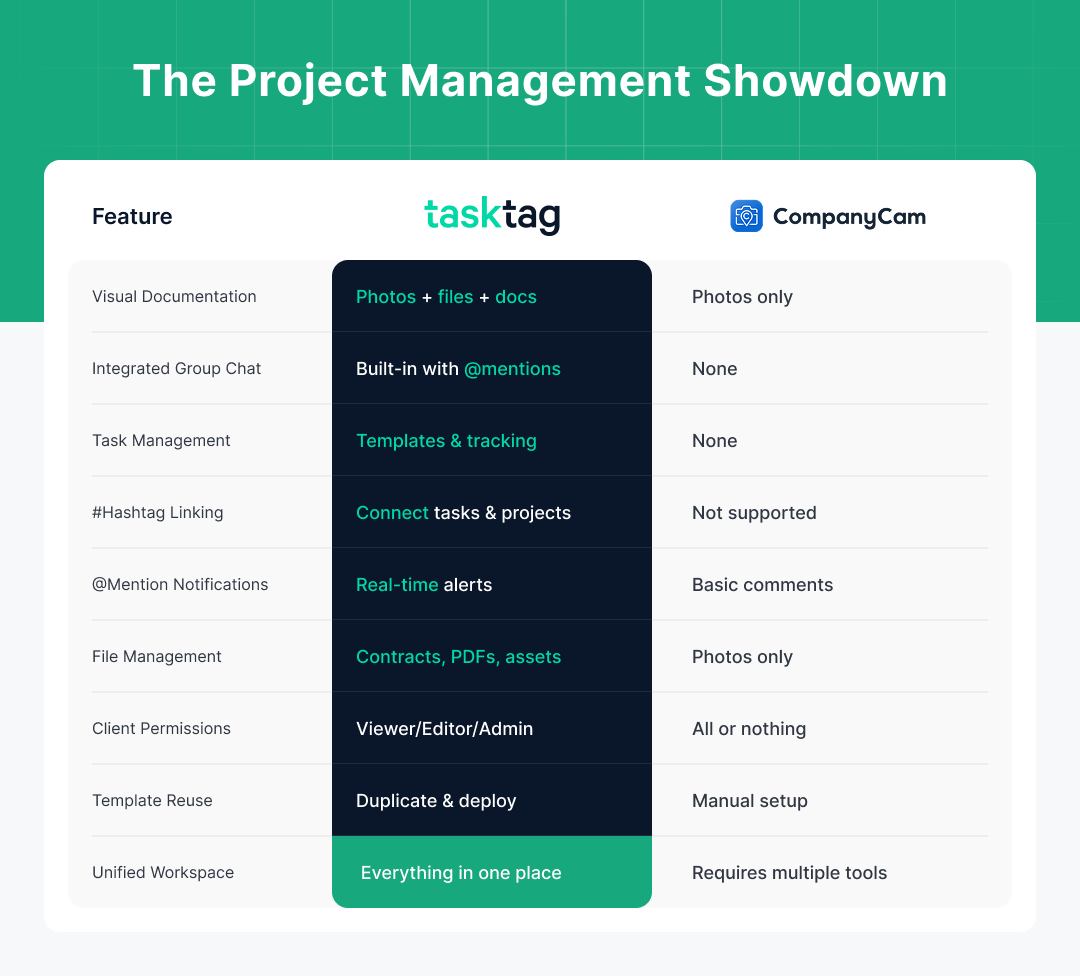
CompanyCam vs TaskTag: The Project Management Showdown
| Project Need | CompanyCam | TaskTag |
|---|---|---|
| Visual Documentation | ✅ Photos only | ✅ Photos + files + docs |
| Integrated Group Chat | ❌ None | ✅ Built-in with @mentions |
| Task Management | ❌ None | ✅ Templates & tracking |
| #Hashtag Linking | ❌ Not supported | ✅ Connect tasks & projects |
| @Mention Notifications | ❌ Basic comments | ✅ Real-time alerts |
| File Management | ❌ Photos only | ✅ Contracts, PDFs, assets |
| Client Permissions | ⚠️ All or nothing | ✅ Viewer / Editor / Admin |
| Template Reuse | ❌ Manual setup | ✅ Duplicate & deploy |
| Unified Workspace | ❌ Requires multiple apps | ✅ Everything in one place |
“We ditched CompanyCam, Slack, and Trello for TaskTag. Client onboarding went from 3 days to 3 hours.”
— Jessica M., Agency Operations Director
The Viral Client Onboarding Workflow (Step-by-Step)
1. Create Project & Group Chat Together
- Project: "Client: TechStartup Inc."
- Group Chat: "#techstartup-onboarding"
- Members: Your team + client stakeholders
Alignment from the start — no extra setup.
2. Deploy Onboarding Template
Use a reusable task template to assign immediately:
#contract-signing→ @legal-team#brand-assets→ @design-team#kickoff-meeting→ @account-manager#access-credentials→ @tech-team#billing-setup→ @finance
Everything is ready to go before the kickoff meeting.
3. Communicate Everything in Chat
Real conversation with context:
less
@Sarah The #contract-signing is complete
@Mike Please upload brand guidelines to #brand-assets
Client logos attached here 👆
No need to bounce between email, Slack, and Drive.
4. Track Progress Through #Hashtags
Click any hashtag to see:
- Assigned team members
- Task status
- Linked messages and files
- Comments or approvals
Every task is visible and traceable — no guessing.
5. Share Files Where Discussion Happens
- Contracts uploaded in chat
- Brand assets shared inline
- Feedback added directly in thread
Everything is searchable and centralized.
6. Complete & Archive or Duplicate
Once onboarding is done:
- Archive project for recordkeeping
- Or duplicate the template for your next client
Every version improves with time.
Power Moves for CompanyCam Converts
- Centralize everything — One tool, one login, one source of truth
- Use @mentions — Ensure accountability with real-time notifications
- Hashtag everything — Link related items, track faster
- Give clients Viewer access — Transparency without risk
- Template your success — Standardize what works and scale it
The Business Impact: Real Results from Real Teams
- 80% faster onboarding — From contract to kickoff in hours
- Zero dropped tasks — @mentions close the loop
- 50% fewer emails — Clients check chat, not inboxes
- 100% transparency — Everyone sees what’s happening
- 5x faster execution — No tool switching, no data loss
Why This Workflow Is Breaking the Internet
- Solves the #1 agency pain point — scattered communication
- Works for any service business — agencies, freelancers, consultants
- Delivers immediate ROI — faster onboarding, fewer mistakes
- Requires no learning curve — if you can chat, you can use it
- Scales with growth — one client or one hundred
Related: Recurring Delivery Route Workflow: Why Delivery Teams Are Replacing CompanyCam with TaskTag
What Teams Are Searching (And Finding)
This workflow ranks for:
- CompanyCam alternative for agencies
- Client onboarding project management
- Project management with integrated chat
- Task management with @mentions
- #Hashtag project tracking
- Unified collaboration platform
- Client portal with chat
- Agency workflow automation
It’s built for exactly what your team is Googling.
Ready to Transform Client Onboarding?
CompanyCam documents what was built.
TaskTag manages how it's built.
Stop treating onboarding like a photo album. Start managing it like the collaborative process it actually is.
Access the Full Client Onboarding Workflow
Includes:
- Ready-to-use templates
- @mention best practices
- Hashtag tagging system
- Group chat setup checklist
- CompanyCam migration guide
What Agencies Are Saying
“Went from CompanyCam + Slack + Asana to just TaskTag. Clients love having everything in one place. We love having our sanity back.”
— Alex R., Creative Director
“The @mentions and #hashtags changed everything. It’s like Slack and Asana had a baby that actually works.”
— Maria K., Project Manager
“Client onboarding used to take 3 days. Now it’s 3 hours. The ROI was immediate.”
— Tom L., Agency Owner
The Bottom Line
Photos prove work happened. TaskTag ensures work happens smoothly.
Your competitors are already using integrated project platforms.
Your clients expect unified communication.
Your team deserves a system that works.
This isn't just an app switch. It's a system shift.