

Outgrowing Trello? Here’s Why It Happens (and How TaskTag Fixes It) Trello is perfect when you’re...
.png?width=1080&height=810&name=3%20(3).png)
Why This Blog Is a Must-Read (And Why It's Exploding Online)
If you’ve been searching for:
- “event planning workflow”
- “project management for events”
- “CompanyCam alternatives for coordination”
— you’re in the right place.
This blog is going viral because it solves a major problem for teams using photo-first tools like CompanyCam: while great for visual documentation, they fail at real event management.
In today’s fast-paced world, event planning requires more than snapshots. You need:
- ✅ Task tracking
- ✅ Team collaboration
- ✅ File sharing
- ✅ Repeatable workflows
That’s why TaskTag’s Event Planning Workflow is catching fire. It transforms messy spreadsheets and scattered chats into a chat-powered command center for any event. For those tired of duct-taping apps together, this is your upgrade path.
.png?width=1080&height=1080&name=2%20(5).png)
CompanyCam vs TaskTag: When Photos Aren’t Enough for Event Success
CompanyCam is great for capturing event photos—but not for managing the actual event.
Here’s how TaskTag outperforms as a full event coordination platform:
| Feature | CompanyCam | TaskTag |
|---|---|---|
| Photo & File Uploads | ✅ Strong for images | ✅ Supports all file types (floor plans, contracts, menus) |
| Task Checklists | ❌ Limited | ✅ Built-in with due dates |
| Group Chat Integration | ❌ None | ✅ Real-time chat with @mentions & #hashtags |
| Project Templates | ❌ No | ✅ Reusable for recurring events |
| Team Assignments | ❌ Basic | ✅ Advanced with roles & permissions |
| Report Export | ❌ Manual | ✅ One-click PDF recaps |
| Workflow Automation | ❌ Photo-focused | ✅ Full project management features |
“We used CompanyCam for event photos, but planning was a mess of emails and Sheets. TaskTag gave us one hub for everything — tasks, files, and chat.”
— Event Coordinator, Hospitality Firm
CompanyCam documents the event. TaskTag ensures it happens — on time, with zero chaos.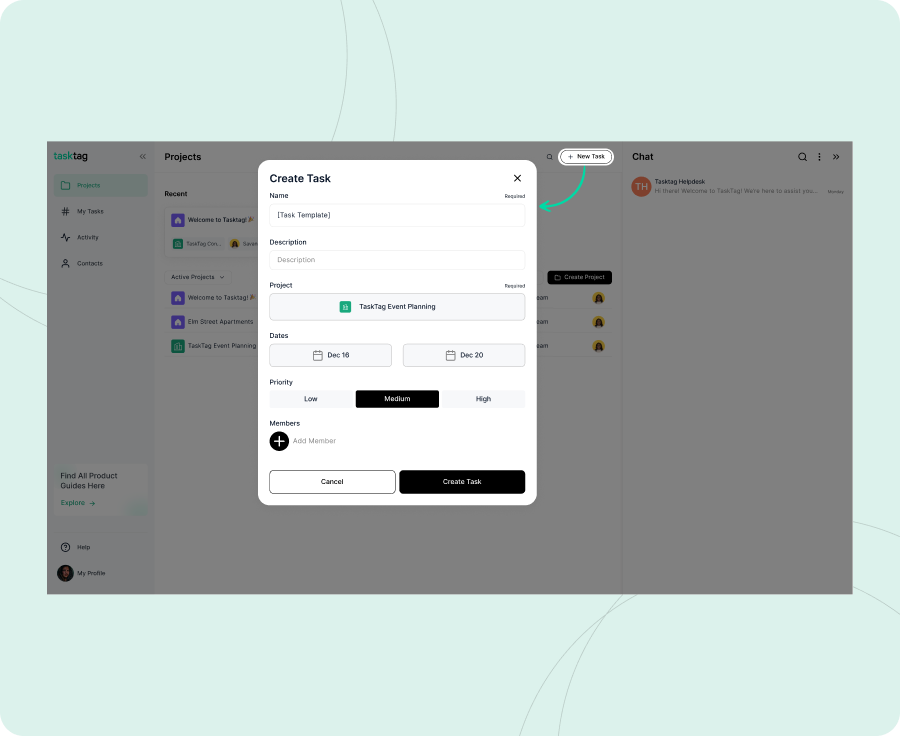
The Real Problem: Event Planning Chaos Beyond Photos
Even with great photos, event teams still face:
- Scattered files (floor plans in Drive, contracts in email)
- Forgotten tasks (who confirmed the caterer?)
- Communication gaps (endless “Did you see that?” messages)
- No repeatability (reinventing the wheel every time)
This leads to delays, rework, and stress.
That’s why teams searching for “event project management software” or “task tracking for hospitality” are switching to TaskTag—a true all-in-one solution.
The Solution: TaskTag’s Event Planning Workflow — Your New Command Center
TaskTag turns event planning into a structured, repeatable project workflow. With templates, checklists, chat, and file sharing all in one view, you get:
- ✅ Clear task ownership
- ✅ Seamless communication
- ✅ Real-time updates
- ✅ Centralized files
- ✅ Scalable coordination
Step-by-Step: How Top Teams Plan Events in TaskTag
Step 1: Create Your Event Planning Template
- Add master tasks: “Book Venue,” “Confirm Catering,” “Setup AV”
- Create checklists (e.g., select menu, confirm dietary needs)
- Upload reference docs like sample floor plans and contracts
Step 2: Duplicate for Every Event
- Copy the template for “Q1 Launch Party”
- Update dates, deadlines, and task assignments
- Add key team members
Step 3: Coordinate via Chat
- Create a channel:
#q1-launch-party - Use @mentions:
@Lisa handle #confirm-catering - Link updates with hashtags:
#book-venue update: Contract signed
Step 4: Upload Files & Track Approvals
- Drop in floor plans, menus, and contracts
- Use comments for approvals: “Client approved buffet menu”
Step 5: Complete Tasks & Export Recap
- Check off items as they’re done
- Add proof like signed contracts or event photos
- Export a PDF report for internal or client review
Business Benefits: Why TaskTag Beats CompanyCam for Events
- ✅ 50% faster planning using reusable templates
- ✅ Zero lost files with centralized uploads
- ✅ Improved collaboration via chat and mentions
- ✅ Seamless client reporting with exportable PDFs
- ✅ Scales easily across 10 or 100 simultaneous events
Pro Tips for Event Planners
| Tip | Why It Helps |
|---|---|
| Use templates | Save hours on recurring events |
| @Mentions for assignments | Improve accountability |
| #Hashtags for linking | Keep tasks and updates connected |
| Upload inside tasks | Centralize approvals and files |
| Export PDFs | Deliver polished recaps to clients |
Ready to Upgrade Your Event Planning?
CompanyCam captures moments. TaskTag orchestrates the entire event.
👉 Download TaskTag Now
(Includes free event planning template, checklist system, and setup guide)
What Teams Are Saying
“Switched from CompanyCam + Sheets to TaskTag. Events now run like clockwork.”
— Marketing Director, Tech Firm
.png?height=200&name=1%20(23).png)

.png?height=200&name=4%20(4).png)