
Client Onboarding Checklist: How Agencies & Freelancers Onboard Clients Without the Chaos
Table of Contents
Client Onboarding Software That Keeps Agencies Organized
Let's be honest—onboarding new clients shouldn't feel like herding cats. Between sending welcome emails, chasing down brand assets, collecting login credentials, and getting contract signatures, things slip through the cracks. Your team is switching between Slack, email, Google Drive, and project management tools just to get one client started.
TaskTag replaces that fragmented mess with a chat-based client onboarding workflow. Every contract, brand doc, approval, and login guide lives in one searchable project—not scattered across platforms.
Who this is for: Marketing agencies, design studios, freelance consultants, SaaS customer success teams, and any service business that needs a repeatable client onboarding process.
What this solves: This workflow eliminates the "where did they send that file?" panic by centralizing onboarding documents, tasks, and communication in one place—with reusable templates you can deploy in minutes.
Common Client Onboarding Challenges: Lost Files, Forgotten Steps, and Frustrated Teams
Without a structured client onboarding system, most teams rely on:
- Email threads that become impossible to search
- Shared drives where files are buried in folders
- Manual checklists in spreadsheets or Notion
- Slack channels that mix internal chat with client communication
- No clear record of what was approved or when
This creates:
- Missed onboarding steps that delay project kickoff
- Clients asking "Did you get my files?" repeatedly
- Team members working from outdated information
- No accountability for who's responsible for what
- Unprofessional client experience from day one
How Chat-Based Client Onboarding Creates a Professional First Impression
With TaskTag's client onboarding checklist workflow:
- You create a dedicated project for each new client
- Your team uses a group chat to coordinate onboarding tasks in real time
- Each client gets an onboarding task with a custom checklist you can reuse
- All contracts, brand docs, and credentials are uploaded where the conversation happens
- You track progress with hashtags—no manual status updates needed
- Clients can upload files directly using simple task assignments
- When onboarding is complete, you archive the record or duplicate the template for your next client
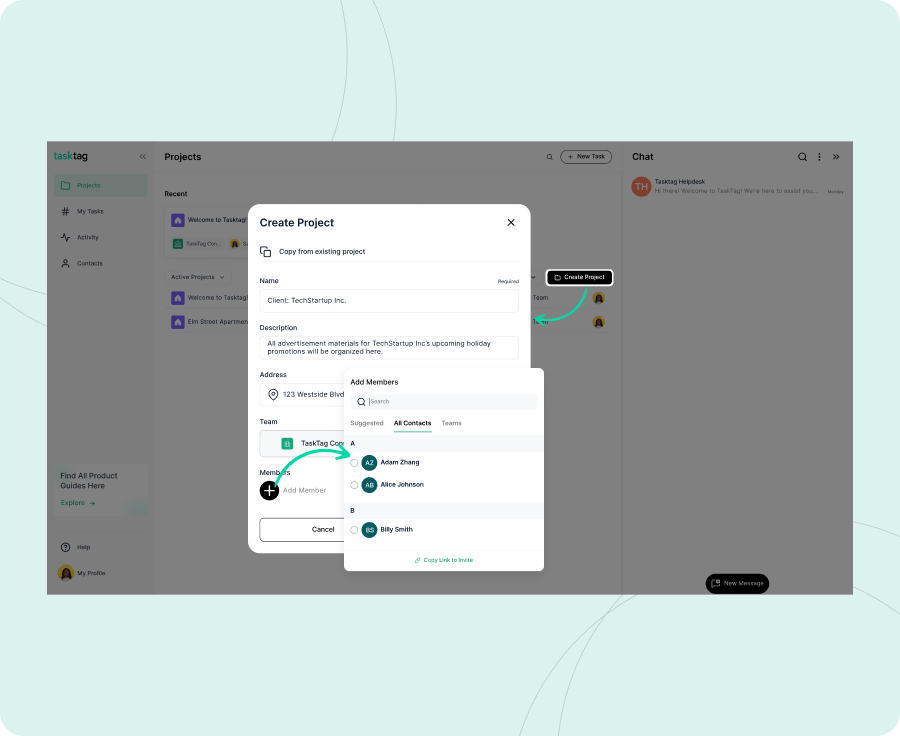
- Acme Corp - Q1 2026 Social Media Campaign
- Smith Consulting - Website Redesign
- TechStart SaaS - Customer Success Onboarding
- Riverdale Construction - Branding & Marketing
Pro Tip: Use consistent naming conventions so your team can quickly find any client project. For agencies managing multiple clients, check out our guide on TaskTag vs Trello for growing teams.
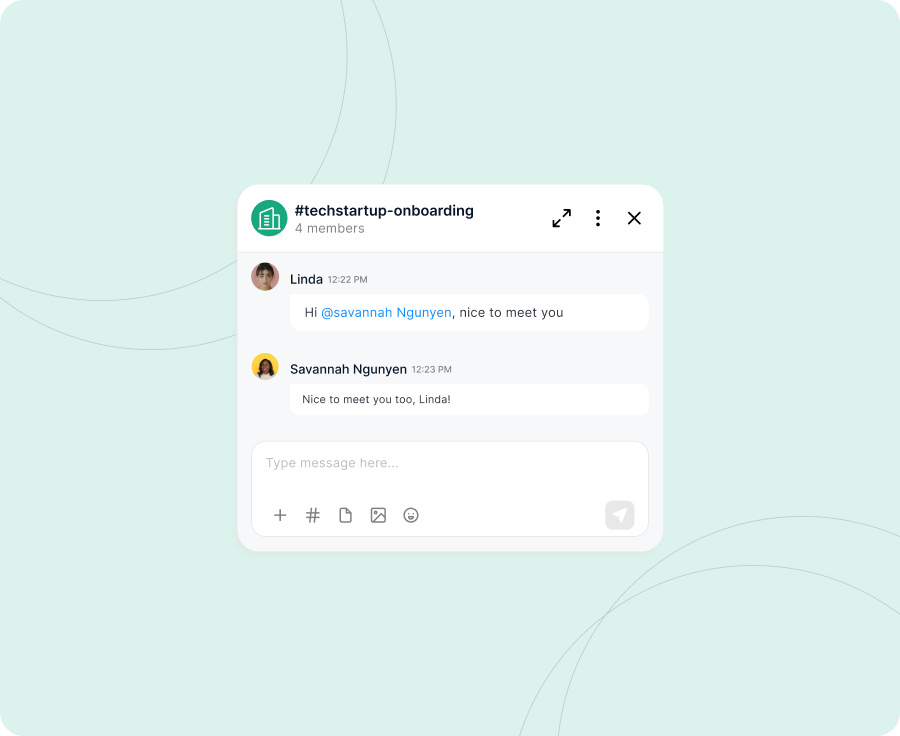
- Add account managers, designers, developers, or strategists
- Include client stakeholders who need visibility
- Use this chat for quick questions, status updates, or timeline changes
Why this matters: Instead of scattered Slack DMs and email threads, everything client-related lives in one searchable feed. Learn more about centralizing client communication with TaskTag.
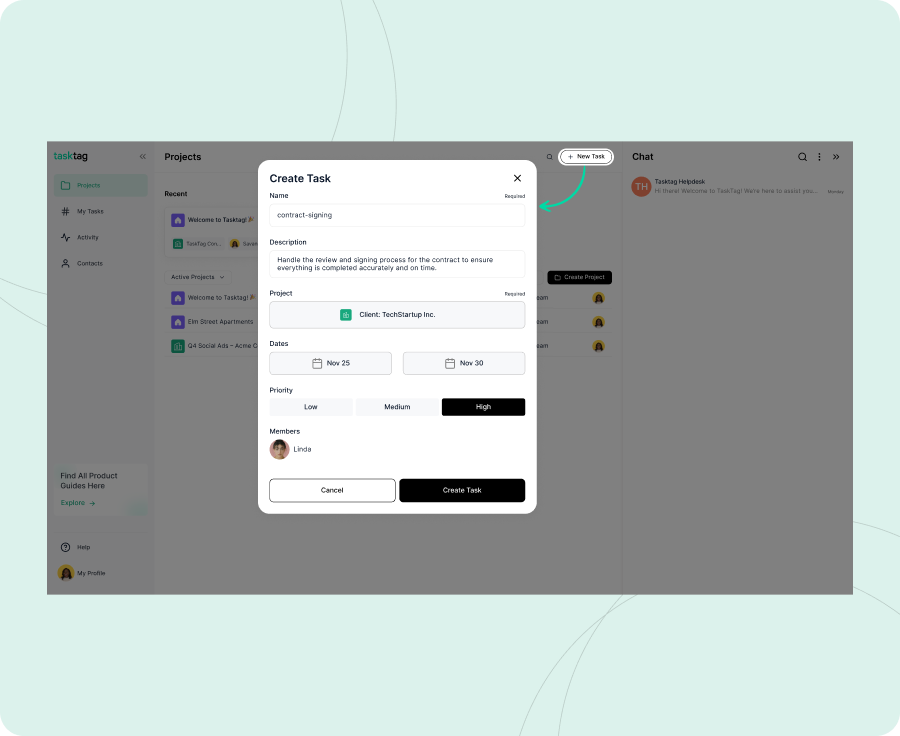
Create a task called "Client Onboarding - [Client Name]" and build your checklist:
Agency Client Onboarding Checklist Template:
- [ ] Welcome email sent to primary contact
- [ ] Service agreement signed and uploaded
- [ ] Brand guidelines document received
- [ ] Logo files (PNG, SVG, EPS) collected
- [ ] Website login credentials shared securely
- [ ] Social media account access confirmed
- [ ] Project timeline and milestones reviewed
- [ ] Kickoff meeting scheduled
- [ ] Internal team briefed on client goals
- [ ] Client added to project communication hub
SaaS Customer Onboarding Checklist Template:
- [ ] Welcome email and getting started guide sent
- [ ] Account provisioned and credentials shared
- [ ] Onboarding call scheduled with CSM
- [ ] Integration requirements documented
- [ ] Team training session completed
- [ ] Success metrics and goals defined
- [ ] Support contact information provided
- [ ] First check-in meeting scheduled (30 days)
Freelance Consultant Onboarding Checklist:
- [ ] Project scope document signed
- [ ] Invoice and payment terms agreed upon
- [ ] Discovery questionnaire completed by client
- [ ] Access to necessary tools/platforms granted
- [ ] Communication preferences established
- [ ] Project kickoff date confirmed
- [ ] First deliverable deadline set
Why reusable templates save time: Build it once, duplicate it for every new client. No more rebuilding onboarding checklists from scratch.
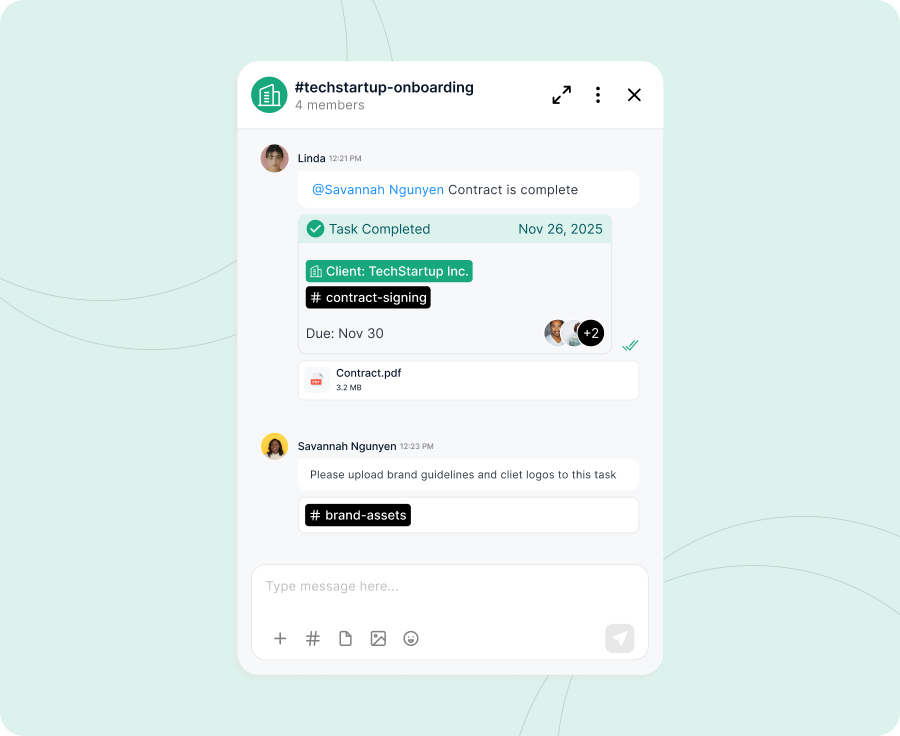
As your team works through onboarding, they post updates in the project chat using hashtags:
Example onboarding updates:
"Contract signed by Sarah at Acme Corp. Moving forward with kickoff next Tuesday. #Onboarding_AcmeCorp"
"Still waiting on brand guidelines. Sent follow-up email with deadline reminder. #Onboarding_AcmeCorp"
"Received all logo files. Organized in the Brand Assets task. Ready for design phase. #Onboarding_AcmeCorp"
"Kickoff call completed. Client approved timeline and first milestone deliverables. #Onboarding_AcmeCorp"
All chat messages with hashtags are automatically linked to your onboarding task—creating a searchable, timestamped record of every onboarding activity.
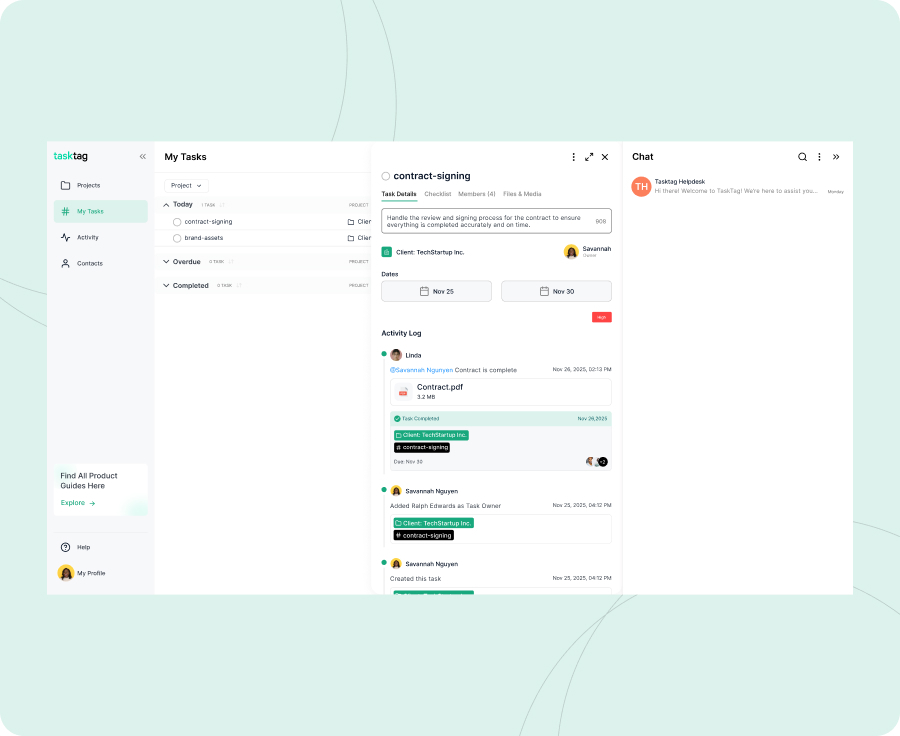
- Signed contracts and service agreements
- Brand guidelines and style guides
- Logo files (all formats)
- Website and platform login credentials (use task comments for secure sharing)
- Project briefs and discovery documents
- Onboarding presentations or welcome decks
Files can be uploaded:
- Directly in the onboarding task
- In chat messages using the project hashtag
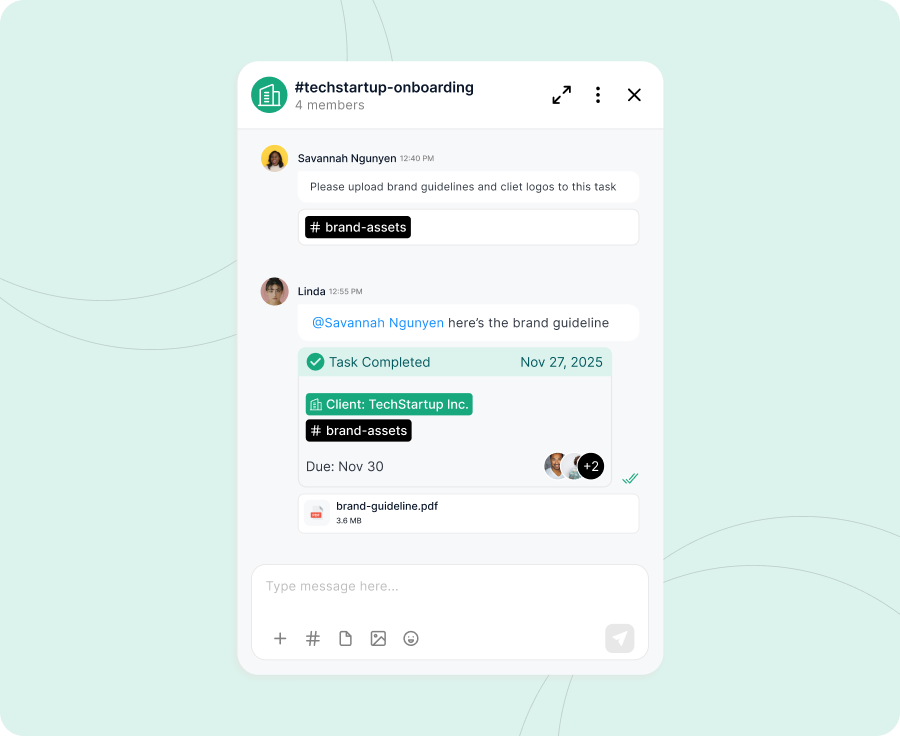
- By the client themselves through assigned tasks
Pro Tip: Create a task called "Brand Assets - [Client Name]" and assign it to your client contact. They upload everything you need in one place. Read our guide on building a client upload portal.
All files are timestamped and permanently attached to the project—no more "Can you resend that?" emails.
- All messages related to client onboarding
- Every file uploaded during onboarding
- Task approvals and sign-offs
- Outstanding items that need attention
Search examples:
- #Onboarding_AcmeCorp - Shows complete onboarding activity
- #BrandAssets - Shows all brand files across clients
- #ContractSigned - Shows which clients have signed agreements
This makes it easy to:
- Answer "What's the status?" questions immediately
- Identify bottlenecks holding up onboarding
- Review past client onboardings when refining your process
- Train new team members using real examples
- ✅ All checklist items are checked off
- 📎 Contracts, brand docs, and credentials are uploaded
- 💬 Kickoff meeting notes are documented in chat
- 🏷️ Everything is tagged with the client hashtag
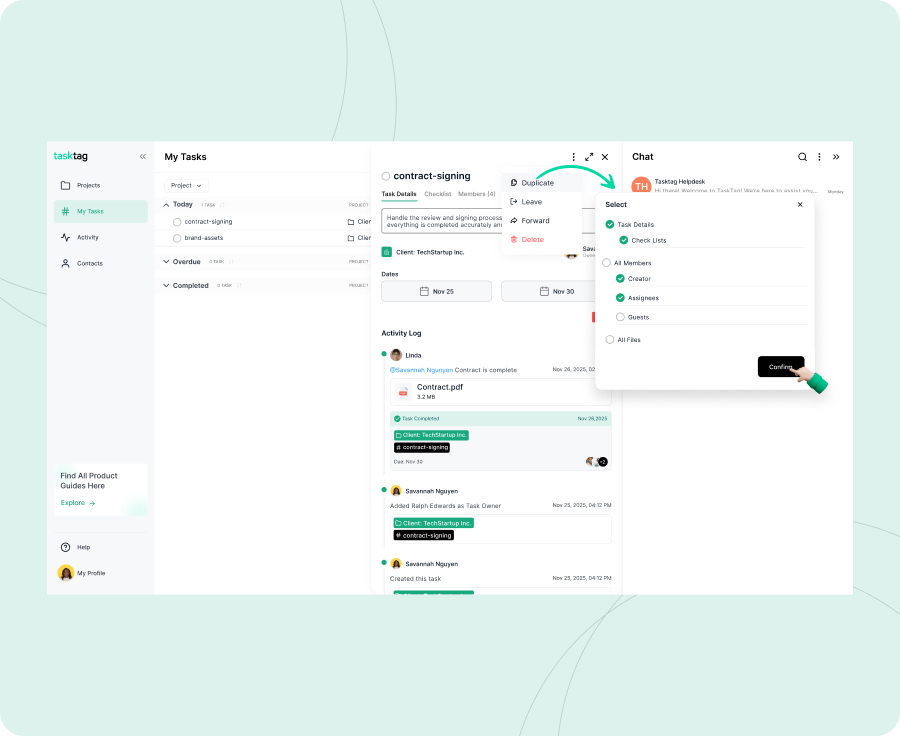
Mark the onboarding task Complete and move into project execution.
What happens next:
For your current client:
- The onboarding record is permanently archived with timestamps
- Your team can reference onboarding details anytime during the project
- If questions arise, search the hashtag to find the answer instantly
For your next client:
- Duplicate the onboarding task and rename it for the new client
- Your checklist template carries over automatically
- Adjust any client-specific details and you're ready to go
Project: Acme Corp - Q1 2026 Social Media Campaign
Task: Client Onboarding - Acme Corp
Activity log includes:
|
Type |
Example |
|
✅ Checklist |
All 10 onboarding items completed |
|
📎 File |
Signed service agreement (PDF uploaded Jan 15) |
|
📎 File |
Brand guidelines document (PDF uploaded Jan 16) |
|
📎 File |
Logo files package (ZIP uploaded Jan 16) |
|
💬 Message |
"Contract signed by Sarah at Acme. Moving to kickoff. #Onboarding_AcmeCorp" |
|
💬 Message |
"Kickoff call completed. Timeline approved. First milestone: Feb 1. #Onboarding_AcmeCorp" |
|
💬 Message |
"Social media account access confirmed. Ready for content creation. #Onboarding_AcmeCorp" |
Best Practices for Client Onboarding with TaskTag
Build reusable templatesCreate your onboarding checklist once, duplicate it for every client
Assign file upload tasks directly to clients
Let clients upload brand assets and documents themselves—no more email back-and-forth
Use consistent hashtags across projects
Makes it easy to find patterns and improve your process
Keep internal notes separate from client-visible content
Use task comments for approvals and sensitive information
Set due dates for onboarding milestones
Creates urgency and accountability for both your team and the client
Archive completed onboardings
Maintain a clean workspace while preserving the full record
Done State Checklist
- [ ] Client project created with clear naming
- [ ] Group chat established with team and client stakeholders
- [ ] Onboarding task created with custom checklist
- [ ] All contracts and brand docs uploaded
- [ ] Client credentials securely shared in task comments
- [ ] Progress tracked through hashtag search
- [ ] Onboarding task marked complete
- [ ] Template duplicated and ready for next client
Business Impact: How Streamlined Client Onboarding Improves Agency Operations
✅ Faster client onboarding — Get clients from signed contract to project kickoff in days, not weeks
✅ Better client experience — Clients see a professional, organized system from day one
✅ Reduced admin time — Stop chasing files and resending documents
✅ Clear accountability — Everyone knows what's pending and who's responsible
✅ Reusable process — Onboard your 10th client as efficiently as your first
✅ Complete audit trail — If questions arise months later, the full record is searchable
"TaskTag helped us cut client onboarding time in half. No more hunting for files or wondering what step we're on. Everything's in one place."
– Julia R., Account Manager
Frequently Asked Questions: Client Onboarding with TaskTag
Q1: Can I use TaskTag for onboarding multiple clients at the same time?
A: Absolutely. Create a separate project for each client. Your onboarding template can be duplicated across all of them, keeping each client's workflow independent and organized.
Q2: How do I securely share login credentials with my team during onboarding?
A: Use task comments within the onboarding task for sensitive information like passwords. Only team members with project access can view task comments, keeping credentials secure and context-specific.
Q3: Can clients upload files directly, or do I have to collect everything via email?
A: Clients can upload files directly. Create a task like "Upload: Brand Assets" and assign it to your client contact. They upload everything you need in one place—no email attachments required. Learn more in our client upload portal guide.
Q4: What happens to the onboarding checklist after the client project starts?
A: Mark the onboarding task complete and it's archived within the project. You can still reference it anytime, but it won't clutter your active task list. The full record remains searchable.
Q5: Can I share the onboarding checklist with the client so they know what to expect?
A: Yes. Share the onboarding task with your client contact. They'll see the checklist, can upload requested files, and track progress alongside your team—creating transparency from day one.
Q6: How is TaskTag different from using Notion or ClickUp for client onboarding?
A: TaskTag is built around chat and conversation, not pages or boards. Onboarding happens where your team is already talking—no need to switch contexts or update status in multiple places. Everything flows naturally.
Related: Why growing teams outgrow Trello.
Ready to Onboard Clients Without the Chaos?
With TaskTag's client onboarding workflow, you'll have a professional, repeatable system that gets new clients started fast—without the scattered files, forgotten steps, or frustrated team members.
No more email threads. No more "Where's that file?" panic. Just smooth, organized onboarding every time.
Book a demo today to see how agencies are onboarding clients faster with TaskTag.Free Plan
Free
No cost, no commitment
-
Send unlimited messages on web and mobile
-
Manage projects and tasks with core features
-
Create and track up to 3 active projects
-
2GB limit for photos, videos and files
TaskTag Teams
$16/month
Enjoy Unlimited contributors
-
Track all activity across your team with the Global Activity Log
-
Organize your crews with Contact Groups
-
Get unlimited Project creation and personalized white-glove onboarding