

TaskTag vs CompanyCam: The Best Before and After Photo Workflow for Construction Pros If you’ve...
.png?width=1080&height=810&name=1%20(42).png)
Introduction
Construction sites are fast-paced, high-stakes environments. From framing and roofing to inspections and closeouts, visual documentation is essential for tracking progress, resolving disputes, and verifying completed work.
That’s where construction photo documentation software comes in.
These tools help contractors, project managers, and field teams capture, tag, and organize jobsite photos — turning visual data into reliable records that support billing, compliance, and quality control.
In this guide, we’ll explore the top software options, key features to look for, and how photo documentation transforms modern construction workflows.
What Is Construction Photo Documentation Software?
Construction photo documentation software is a digital solution that allows teams to:
- Take and upload jobsite photos from mobile devices
- Tag photos by task, location, or trade
- Organize images by project, date, or crew
- Share visual updates with stakeholders in real time
- Maintain a visual record of progress, punch items, and safety compliance
It replaces scattered photo folders, random text messages, and unsearchable camera rolls with a centralized, searchable system — ideal for modern jobsite management.
Top Features to Look For
| Feature | Why It Matters |
|---|---|
| Mobile Uploads | Field crews can document work instantly on-site |
| Task or Location Tagging | Easily sort and find photos by room, phase, or trade |
| Time-Stamps | Verify when work was completed |
| Offline Access | Capture images even without internet, sync later |
| Photo Comments/Notes | Add context for inspections or issues |
| Integration | Sync with project tools like Procore or TaskTag |
Best Construction Photo Documentation Software in 2026
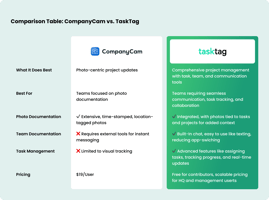
TaskTag
Best for: Real-time photo documentation tied directly to tasks
- Upload photos directly to assigned tasks
- View visual progress by trade or phase
- Use photos for punch list validation and billing support
- Built for field teams — no training needed
📌 Perfect for GCs and subcontractors who want fast, field-friendly tools.
OpenSpace
Best for: 360° jobsite capture and progress tracking
- Walk the site with a hard-hat camera
- AI auto-maps your path and location
- Compare progress over time with side-by-side visuals
Procore Photo Module
Best for: Large-scale project tracking with full integration
- Link photos to RFIs, change orders, and drawings
- View photo logs by date, location, or user
- Built into the Procore ecosystem
Raken
Best for: Daily reports with embedded photos
- Add photos to daily logs from the field
- Share visual reports with clients or GCs
- Simple UI for field crews
PlanGrid (Autodesk Build)
Best for: Linking photos to plans and punch lists
- Attach photos to sheets or inspection items
- Track quality, safety, and progress visually
- Part of Autodesk Construction Cloud
Why Photo Documentation Matters in Construction
Proof for Progress Billing
Show completed milestones with time-stamped photos.
Reduce Disputes
Use visual records to resolve change order or quality disagreements.
Faster Closeouts
Document punch items and fixes instantly with before/after images.
Improve Safety and Compliance
Capture safety violations, training, and PPE usage in real time — useful for any construction safety management routine.
Use Case Example: Roofing Project
Without photo documentation:
GC disputes whether work was complete before the rain. No proof.
With software like TaskTag:
Photos uploaded when the crew finished show dry, completed work with time-stamp. Dispute resolved.
Final Thoughts
Construction photo documentation software is no longer optional — it’s a core part of running efficient, accountable, and compliant projects. Whether you're a GC, subcontractor, or project manager, the right tool helps you document smarter, not harder.
Next Step: Build a Visual Record That Works for You
Whether you're managing one job or ten, the right photo documentation tool can save you hours in admin, protect your team from disputes, and improve client trust.
Explore your options, test the tools, and start building smarter.

.png?height=200&name=2%20(6).png)